


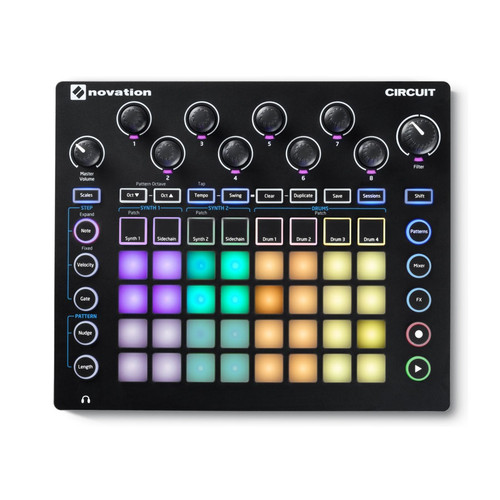
Start witha beat
Make Circuit yoursequencer, synth and sampler.Integrate with your favourite hardware, and develop and perform your productions - switching between drums, basslines and chords.
Letthe beat build
A beat is just the beginning of your journey, but the possibilities are endless. Make a drum workflow entirely on Circuit, featuring a four-on-the-floor kick that calls for a sampled snare and hi-hat. The Sample Flip function makes it possible for you to create multisample drum lines on each of Circuit's four drum tracks. Then Drum Micro Steps add instant fills and stutter effects to your beats. J Dilla fans should probably board here.
Addthebassline
Pick a Nova synth patch that’s doing nearly what you want and use the macro knobs to edit. Select the scale. Play a bassline – notes can be added, edited and deleted.
Make your production more fluid
Add steps and automation, and edit each step, giving the beat more feel and groove. Build on the drum samples using Components software.
Remove or bring back tracks and automation, and get a mixed output by balancing sounds and panning them in the stereo field. Choose delay and reverb, slew between the presets and apply them to parts, or kill the effects. Go crazy with effects and use the filter to create a dynamic edge and tension.
Add another synth
Audition and change an additional synth sound. Use the second six-voice polyphonic synth engine to create a chord pattern, choose an octave, and duplicate a chord to different positions in the sequence.
Change the gate length, and put really short notes and musical expression into your sequences using Fractional Gate. Then apply a side-chain to get the synth pumping.
Arrange the production
Add structure to your music by making and changing a chain of eight patterns, mixing up the chords, notes and octave to give variation. Save your creation as one of 32 sessions, and change session to get some fantastic performance arrangements.
Connect with devices
Create audio landscapes by integrating MIDI-compatible outboard processors, synchronising with other drum machines or grooveboxes, or triggering synths. Sync Circuits by using mini-jack cables to easily daisy–chain them together, or add a Circuit Mono Station to open up a world of analogue filtration and distortion.
Tech Spec
Product Hardware Specifications
32 RGB backlit velocity sensitive button grid
28 RGB backlit function buttons
8 Continuous pots with RGB indicator LEDs
Dedicated filter and volume pots
1/4" jack sockets for left and right outputs
Two MIDI sockets (3.5mm jack sockets with MIDI din break-out cables)
USB socket
Front-mounted 3.5mm jack socket for headphones
Integrated speaker
Rubberised knob caps
Rotary controls secured to the chassis with metal nuts
Power supply connector
Power switch
Battery compartment for 6x AA batteries (included)
Kensington Security Slot
Sound Engine
2 Nova synths
4 Part drum machine
6 Note polyphonic per synth
64 Synth patches
64 Drum patches
8 Synth macro controls (Control up to 4 parameters with one knob)
4 Drum parameter controls (Pitch, Decay, Distortion, Filter)
Mixer view with levels and mutes



